Free · No sign-up · No watermark of ours
Add a watermark to your video.
Keep the video yours.
Drop a clip, drag your logo or text onto the frame, choose when it shows, and export an MP4. Your video is re-encoded in this tab — it is never uploaded, and nothing of ours is stamped on it.
Restore your previous watermark setup? Your video was never saved — only the marks you made.
Timeline
Drag either end of a barAdvertisement
How to add a watermark to a video
-
01
Drop your video in
MP4, WebM or MOV, up to 500 MB. It is read straight off your disk — there is no upload.
-
02
Place your mark
Add text or a logo, then drag it onto the frame. Resize from a corner, rotate from the handle, set the opacity.
-
03
Time it
Drag either end of the mark’s bar on the timeline to decide when it appears and when it goes.
-
04
Export the finished video
Pick a resolution and press Export. You get an MP4 with your audio intact and no branding of ours.
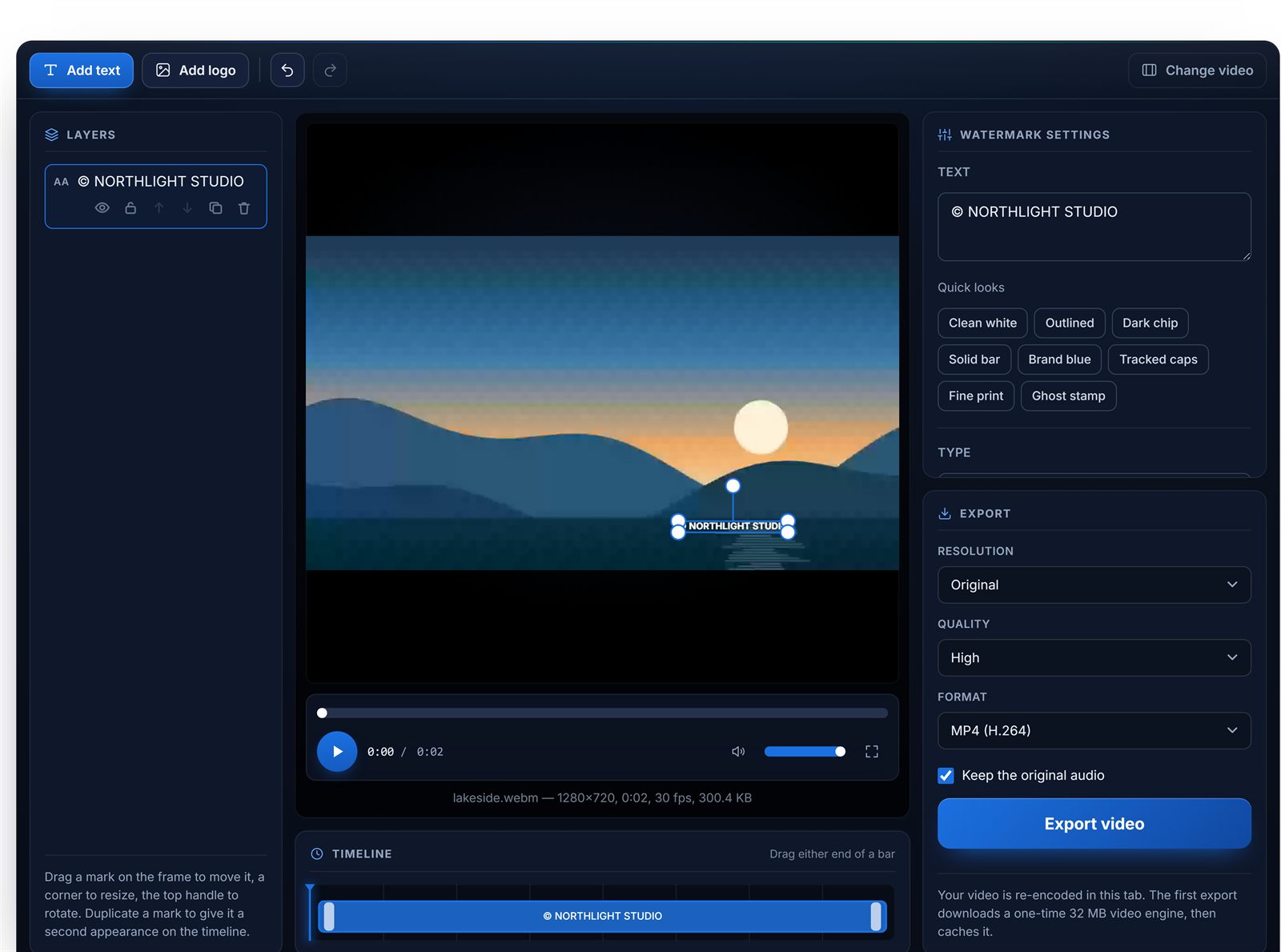
What you see is what gets encoded
The preview is not the video element with a mark floating over it — it is a canvas, drawn by exactly the same code that draws every exported frame. That is deliberate: the one thing a watermark tool must never do is put the mark somewhere other than where you placed it, and the only way to guarantee that is to have a single renderer with nothing to disagree with. Rotation, tiling and opacity all behave in the file precisely as they did on screen.
Why it is fast where it can be
Compositing video in a browser used to mean a WebAssembly encoder running at a fraction of real time. Here the browser’s own hardware video encoder does the frames and a WebAssembly build of FFmpeg only builds the container and re-encodes the audio — a fraction of a second either side. Where no such encoder is available the tool falls back to recording the canvas, which runs at normal playback speed and says so before it starts rather than looking like a hang.
What’s different here
Every widely-used free online video editor stamps its own logo on a free-tier export and charges a monthly subscription to take it off. On a watermarking tool, that is the whole job undone.
| Typical free editor | This tool | |
|---|---|---|
| Its own logo on your export | Usually, on the free plan | Never |
| Uploads your video to a server | Almost always | No — encoded on your device |
| Account required | Usually | No |
| Export minutes or file-size cap | Common on free tiers | Only your browser’s memory |
| Watermark timing | Often whole-video only | Per mark, on a timeline |
Last reviewed: August 2026. Based on the published free tiers of widely-used online video editors as of August 2026. Free-tier terms change — check the current pricing page of any tool you are comparing.
Everything in the editor
Text and logo marks
Thirteen fonts with outline, shadow, tracking and a box behind the text, or a transparent PNG logo. Stack as many as you need.
Free positioning
Drag anywhere on the frame, resize from a corner, rotate with 15° snapping. Position is stored relative to the frame, so it survives an export at a different resolution.
Timeline windows
Each mark gets its own bar. Drag the ends to set start and end. Duplicate a mark for a second appearance later in the clip.
Tiled patterns
Repeat a mark across the frame with independent spacing and its own rotation — much harder to crop out than a corner logo.
Audio kept
The original soundtrack is carried into the export and re-encoded to AAC in the same pass that builds the container. Turn it off with one checkbox.
Real progress and cancel
Named stages with a real percentage, a working cancel button, and a warning up front when a clip is long enough that the export will take a while.
Advertisement
Video watermark FAQ
Does this add its own watermark to my video?
No. Only the mark you place appears in the export. Most free online video editors stamp their own logo or a “made with” label on free-tier exports and charge a monthly fee to remove it — there is no paid tier here to unlock.
Is my video uploaded to a server?
No. The video is decoded, composited and re-encoded in this browser tab, using the browser’s own video encoder and a WebAssembly build of FFmpeg for the final container. Nothing is sent anywhere, which is also why a long export depends on your computer rather than on a queue.
How do I add a watermark to a video for free without an account?
Drop your video in, add a text or logo mark, drag it where you want it on the frame, and press Export. There is no sign-up, no email and no watermark of ours on the result.
Can I make the watermark appear only for part of the video?
Yes. Every mark has its own window on the timeline — drag either end to set when it appears and disappears. For a mark that appears more than once, duplicate it and give the copy a second window.
Will watermarking reduce my video quality?
Adding a watermark means the video has to be re-encoded, so there is some generational loss — that is true of every tool, including desktop ones. Exporting at the original resolution and High quality keeps it invisible in practice. Only a trim with no other change can avoid re-encoding entirely.
What formats and sizes can I use?
MP4, WebM and MOV go in, up to 500 MB and 10 minutes. MP4 with H.264 comes out. A WebM produced by the fallback recorder path stays WebM, because a VP9 stream cannot be rewrapped as MP4 without a second re-encode.
Does the exported video keep its audio?
Yes, unless you turn it off. The original audio track is copied across and re-encoded to AAC in the same pass that builds the MP4 container.
Why does the export take a while?
Every frame is composited and re-encoded on your own machine. Where your browser exposes a hardware video encoder — Chrome and Edge do — this runs several times faster than real time. Where it does not, the fallback records the canvas at normal speed, so a two-minute video takes about two minutes.
Watermarking photos instead? The image watermark tool uses the same editor and adds batch processing, so one setup can be applied to a whole folder and downloaded as a ZIP.
Advertisement
Work with many images at once
Process hundreds of images in a single run — all in your browser. Download results as a ZIP.