إذا كنت تبحث عن ريسيزو مقابل TinyPNG، ربما لا تحتاج إلى قائمة أدوات غامضة أخرى. أنت بحاجة إلى سير عمل عملي يحل مشكلة حقيقية: TinyPNG قوي للضغط الآلي، لكن العديد من المستخدمين يحتاجون أيضًا إلى تغيير الحجم، والخصوصية بدون تحميل، والتحكم في الإخراج القابل للتعديل. يشرح هذا الدليل كيفية اتخاذ القرار الصحيح بشأن الصورة، وكيفية استخدام Resizo Image Compressor وResizer، وكيفية تجنب الأخطاء التي تدمر الجودة أو الخصوصية أو سرعة الصفحة بهدوء.
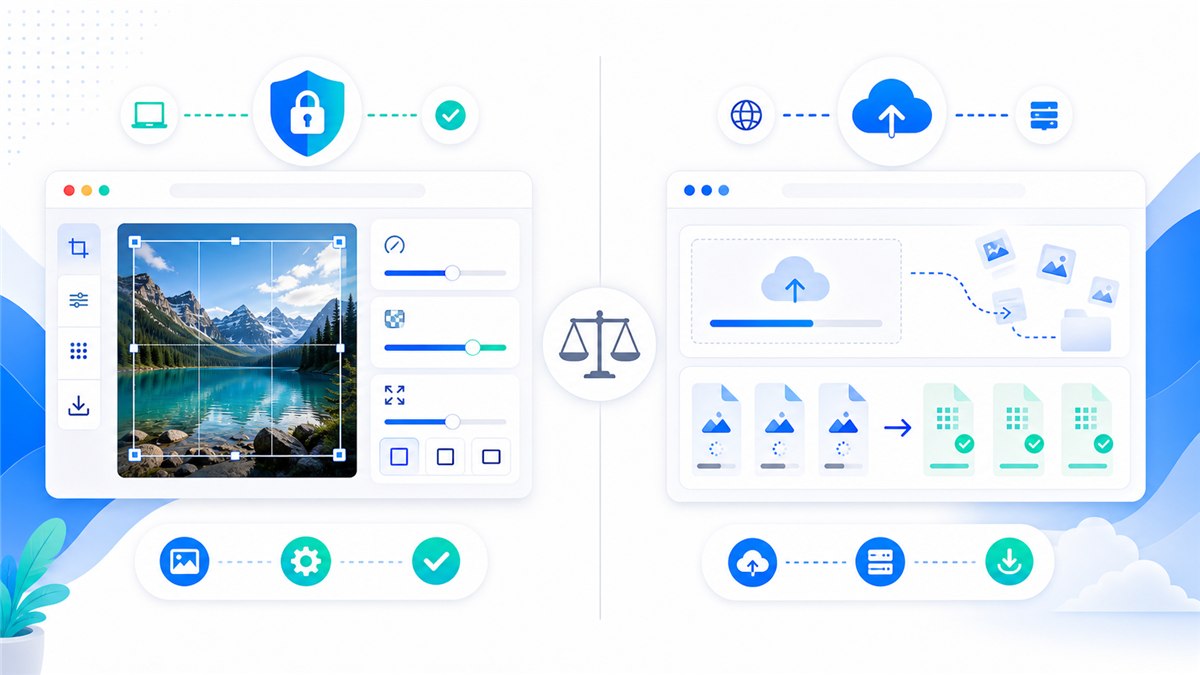
جدول مقارنة TinyPNG و Resizo
| نقطة القرار | يساعد | تايني PNG |
|---|---|---|
| نموذج المعالجة | تغيير الحجم والضغط المحلي في المتصفح | الضغط والتحويل السحابي القائم على التحميل |
| أفضل ملاءمة | تغيير الحجم بالإضافة إلى الضغط بدون تحميل | ضغط مخصص عندما تكون المعالجة السحابية مقبولة |
| حدود مجانية | الحد العملي هو ذاكرة المتصفح/الجهاز | يسرد Tinify 20 ضغطًا مجانيًا لكل جلسة و5 ميغابايت لكل صورة على الويب مجانًا |
| التحكم في الإخراج | اختر الأبعاد والشكل والجودة معًا | يتم اختيار مستوى الضغط تلقائيًا بواسطة Tinify |
| زاوية الخصوصية | تظل الصور الأصلية على الجهاز للمهام المحلية | تصف مصطلحات Tinify تخزين الصور المؤقت لتقديم الخدمة |
لا تهدف هذه المقارنة إلى تحويل كل سير عمل إلى خيار الفائز يأخذ كل شيء. يمكن أن يكون TinyPNG مفيدًا عندما يتوافق سير العمل السحابي أو التشغيل الآلي أو مجموعة الميزات مع احتياجاتك. Resizo هو الخيار الافتراضي الأفضل عندما يجب أن تظل الصورة الأصلية على جهازك، أو عندما تحتاج إلى أبعاد دقيقة قبل الضغط، أو عندما تريد نتيجة سريعة دون احتكاك في الحساب.
مقدمة
Resizo vs TinyPNG: الضغط والخصوصية والتنسيقات والحدود مهمة لأن عمل الصور نادرًا ما يكون مجرد مهمة جمالية. يمكن لصورة واحدة كبيرة الحجم أن تؤدي إلى إبطاء موقع ويب، أو فشل تحميل نموذج، أو الكشف عن محتوى خاص، أو إنشاء معارض منتجات غير متناسقة. يمكن لتصدير واحد مضغوط بشكل مفرط أن يجعل الوجوه تبدو شمعية، والنص غير قابل للقراءة، ورسومات العلامة التجارية غير احترافية.
النهج الأفضل بسيط: ابدأ بالوجهة الحقيقية، وقم بتعيين أبعاد البكسل أولاً، واختر تنسيقًا يناسب المحتوى، وقم بالتصدير مرة واحدة، وافحص النتيجة قبل النشر أو المشاركة. تم بناء Resizo حول سير العمل هذا. فهو يقوم بتشغيل عمليات الصور الشائعة في المتصفح، مما يعني أن مهام تغيير الحجم والضغط والتحويل والمعاينة المدعومة يمكن أن تحدث محليًا بدلاً من طلب مسار التحميل أولاً.
بالنسبة للملفات الحساسة، تعد المعالجة المحلية ذات أهمية خاصة. يمكن أن تحتوي الصور الخاصة على وجوه أو مواقع أو مستندات أو نماذج أولية للمنتج أو لقطات شاشة داخلية أو بيانات تعريفية. حتى عندما تكون الخدمة السحابية شرعية، فإن نموذج الخصوصية يختلف عن سير العمل المحلي للمتصفح. العادة الأكثر أمانًا هي تجنب تحميل النسخ الأصلية إلا إذا كان التحميل ضروريًا وكنت تثق في شروط الخدمة.
ما هو Resizo vs TinyPNG: الضغط والخصوصية والتنسيقات والحدود؟
Resizo vs TinyPNG: الضغط والخصوصية والتنسيقات والحدود هي عملية تحويل الصورة الأصلية إلى مخرجات أكثر أمانًا وأصغر حجمًا وأكثر ملاءمة لوجهة معينة. قد تكون الوجهة بطل موقع ويب، أو معرض منتجات التجارة الإلكترونية، أو نموذج طلب وظيفة، أو مرفق بريد إلكتروني، أو ملف تعريف اجتماعي، أو لقطة شاشة للوثائق، أو مراجعة داخلية للعميل.
من الناحية العملية، يتضمن سير العمل أربعة قرارات: الأبعاد والشكل والجودة والخصوصية. تحدد الأبعاد عدد وحدات البكسل التي تحتوي عليها الصورة النهائية. يحدد التنسيق ما إذا كان الملف يجب أن يكون JPEG أو PNG أو WebP أو أي نوع آخر. تتحكم الجودة في المفاضلة بين الضغط والتفاصيل المرئية. تقرر الخصوصية ما إذا كان يجب بقاء الصورة الأصلية على الجهاز أو تحميلها على معالج سحابي.
تدعم المتصفحات الحديثة تصدير الصور من خلال واجهات برمجة تطبيقات الويب. يمكن لمستندات MDN التي يتم تصديرها من اللوحة القماشية إنشاء نقاط صور وأن التنسيقات مثل PNG مطلوبة بينما يتم دعم JPEG وWebP على نطاق واسع بواسطة العديد من المتصفحات. ولهذا السبب تستطيع أدوات المتصفح أولاً التعامل مع العديد من مهام الصور اليومية دون الحاجة إلى الذهاب إلى الخادم ذهابًا وإيابًا.
لماذا يهم؟
أخطاء الصور باهظة الثمن لأنه من السهل تفويتها. قد يقوم مالك موقع الويب بتحميل صورة هاتف بحجم 5 ميغابايت ويتساءل عن سبب بطء الصفحة. يمكن للطالب ضغط صورة الهوية حتى يصبح النص غير قابل للقراءة. قد يقوم البائع بتحميل صور المنتج بمحاصيل غير متطابقة ويجعل الكتالوج بأكمله أقل جدارة بالثقة. قد يرسل المستقل صور العميل من خلال أداة عشوائية لأنها كانت نتيجة البحث الأولى.
اختر Resizo عندما تريد تغيير الحجم المحلي بالإضافة إلى الضغط في سير عمل متصفح واحد. هذا هو السبب الأساسي لاستخدام سير عمل مركّز بدلاً من التخمين. الهدف ليس مطاردة أصغر عدد ممكن. الهدف هو إنشاء ملف صغير بما فيه الكفاية وواضح بما فيه الكفاية وحجمه صحيح ومناسب لمستوى خصوصية المحتوى.
يوصي Google Search Central أيضًا باستخدام عناصر صور HTML القياسية والنص البديل المفيد والتنسيقات المدعومة والبيانات المنظمة وصفحات الصور التي تم تحسينها من أجل السرعة والجودة. بمعنى آخر، تحسين الصورة ليس مجرد عمل روتيني في التصميم. إنه يؤثر على إمكانية الوصول ورؤية البحث وثقة المستخدم والتحويل.
الفوائد الرئيسية
- يمكنك تقليل وقت التحميل الضائع لأن ضغط الصور المحلي ومقارنة تغيير الحجم يحدث قبل أن يصل الملف إلى موقع ويب أو نموذج أو نظام إدارة المحتوى.
- أنت تجعل المخرجات قابلة للتنبؤ بها: الأبعاد الدقيقة وحجم الملف المعقول والتنسيق الذي يناسب الوجهة.
- يمكنك حماية الصورة الأصلية عن طريق تصدير نسخة محسنة منفصلة بدلاً من تحرير الإصدار الوحيد الذي لديك.
- يمكنك تجنب الأضرار الشائعة المتعلقة بالجودة مثل نسب العرض إلى الارتفاع الممتدة والضغط المتكرر والترقية غير الضرورية.
- يمكنك إنشاء صور يسهل على المستخدمين تنزيلها ويسهل على محركات البحث فهمها عند دمجها مع أسماء ملفات جيدة ونص بديل.
بالنسبة لأصحاب مواقع الويب، والمدونين، وبائعي التجارة الإلكترونية، والمطورين، وفرق المحتوى، فإن الفائدة الأكبر عادةً هي التحكم. عليك أن تقرر ما الذي سيترك الجهاز، وما الذي سيتم تغيير حجمه، والتنسيق الذي سيتم تصديره، ومستوى الجودة المقبول. يصعب الحصول على هذا التحكم عندما تبدأ كل مهمة صورة صغيرة بتحميل إلزامي وتصدير الصندوق الأسود.
دليل خطوة بخطوة
- قرر ما هو الأكثر أهمية: الخصوصية، أو نسبة الضغط، أو الأبعاد الدقيقة، أو حجم الدفعة، أو مجموعة الأدوات.
- اختبر نفس الصورة الأصلية في Resizo Image Compressor وResizer وTinyPNG حتى تتمكن من مقارنة المخرجات الحقيقية بدلاً من المطالبات.
- تحقق من أبعاد البكسل النهائية وتنسيق الملف وحجم الملف. لا يكون الملف الأصغر حجمًا أفضل تلقائيًا إذا كان ضبابيًا أو تم قصه بشكل خاطئ.
- افتح المخرجات بتكبير/تصغير بنسبة 100 بالمائة وافحص الوجوه والنص وحواف المنتج والمناطق الشفافة وتدرجات الألوان.
- بالنسبة للملفات الخاصة أو ملفات العميل، تفضل سير العمل المحلي Resizo بحيث تبقى النسخ الأصلية على الجهاز أثناء تغيير الحجم والضغط.
- بالنسبة للأصول العامة التي يكون فيها الحد الأقصى من الضغط الآلي مهمًا، قارن مخرجات TinyPNG مع تصدير Resizo WebP أو JPEG.
- احتفظ بالملفات الأصلية في مجلد منفصل وقم بتصدير نسخة جاهزة للويب تحمل اسمًا واضحًا.
الإعدادات الموصى بها
| حالة الاستخدام | التنسيق/الأداة الموصى بها | هدف الحجم | أفضل الممارسات |
|---|---|---|---|
| شعار شفاف | احتفظ بصيغة PNG إذا كان يجب أن تظل الشفافية دقيقة | وحدات البكسل الأصلية أو حجم العرض 2x | ضياع PNG أولا؛ WebP فقط بعد الفحص البصري |
| لقطة شاشة لواجهة المستخدم | PNG أو WebP | عرض 1200-1600 بكسل | حافظ على النص واضحًا؛ تجنب عمليات تصدير JPEG المتكررة |
| انقطاع المنتج | PNG أو WebP مع ألفا | حجم السوق أو 2000 بكسل رئيسي | تحقق من الحواف على الخلفيات البيضاء والداكنة |
| رمز الموقع | SVG إن أمكن، وصيغة PNG الاحتياطية | حجم معروض 2x | استخدم أسماء الملفات الوصفية والنص البديل القريب |
هذه الإعدادات هي نقاط البداية، وليست القوانين. تعمل الصورة الشخصية ولقطة الشاشة والشعار الشفاف وصورة منتج السوق بشكل مختلف. اختبر دائمًا بعض الملفات التمثيلية قبل معالجة مجلد كبير.
أفضل الممارسات
- ابدأ بالمنتج الأصلي عالي الجودة الذي لديك. عادةً ما يؤدي تغيير حجم النسخة السيئة إلى تضخيم كتل التمويه والضغط.
- تحديد الأبعاد قبل الجودة. عادةً ما يكون عدد البكسل هو المحرك الأكبر لحجم الملف.
- استخدم تصريح تصدير واحد. تؤدي إعادة فتح نفس الإخراج وإعادة ضغطه مرارًا وتكرارًا إلى حدوث ضرر واضح.
- احتفظ بمجموعة اختبار صغيرة تحتوي على أنواع مختلفة من الصور: صورة شخصية، ومنتج، ولقطة شاشة، وصورة داكنة، ورسم شفاف.
- ' 2` أو المنتجات-main-1200. webp بدلاً من IMG 4829-final.jpg
- احتفظ بالملف الذي تم تصديره بالقرب من النسخة ذات الصلة على الصفحة واستخدم نصًا بديلًا طبيعيًا، باتباع إرشادات Google image SEO.
إحدى عادات الخبراء تُحدث فرقًا كبيرًا: قم بتسمية المخرجات بناءً على الهدف، وليس الحالة المزاجية. ملف يسمى الصفحة الرئيسية-hero-1600.webp يخبر محرر المستقبل ما هو بالضبط. ملف يسمى Final-new-2.jpg لا يخبرهم بأي شيء وعادةً ما يؤدي إلى تكرار العمل.
الأخطاء الشائعة
- تحميل صور حساسة إلى إحدى الأدوات قبل التحقق من كيفية معالجة الخدمة للملفات وتخزينها.
- فرض عرض وارتفاع ثابتين يشوهان الأشخاص أو المنتجات أو الشعارات أو المستندات.
- ترقية صورة مصدر صغيرة وتوقع ظهور التفاصيل الحقيقية. يمكن أن يؤدي رفع المستوى إلى تكبير وحدات البكسل، لكنه لا يمكنه إعادة إنشاء المعلومات المفقودة.
- استخدام PNG لكل صورة. يعد PNG ممتازًا للشفافية والرسومات الحادة، لكن الصور غالبًا ما تصبح كبيرة بشكل غير ضروري.
- تجاهل حالة الاستخدام النهائي. يعد ملف جودة الطباعة الرئيسي ومعاينة الويب السريعة ملفين مختلفين بمتطلبات مختلفة.
- حذف النسخ الأصلية في وقت مبكر جدًا. احتفظ دائمًا بالملفات المصدر حتى يتم تفعيل المجموعة المحسنة والتحقق منها.
الخطأ الأكثر شيوعًا هو تحسين المقياس الخاطئ. الملف الأصغر ليس دائمًا هو الملف الأفضل. أفضل ملف هو الذي يتم تحميله بسرعة، وينظر مباشرة إلى الحجم الذي يراه المستخدمون، ويجتاز متطلبات الوجهة، ولا يكشف عن معلومات خاصة أكثر من اللازم.
نصائح متقدمة
- أنشئ تصديرين لأصول الويب المهمة: إصدار رئيسي بحجم 1600 بكسل للشاشات الكبيرة وإصدار أصغر بحجم 800 بكسل للصور المصغرة أو البطاقات.
- بالنسبة للتجارة الإلكترونية، قم بإجراء عملية قص وخلفية متسقة قبل الضغط. غالبًا ما يكون الاتساق البصري مهمًا بقدر حجم الملف.
- للحصول على لقطات الشاشة، اختبر PNG وWebP. يمكن أن تبدو لقطات الشاشة المثقلة بالنصوص أسوأ إذا تم ضغطها مثل الصور العادية.
- بالنسبة للنماذج ذات الحدود الصارمة لقاعدة المعارف، قم بتغيير حجم الأبعاد أولاً، ثم قم بخفض الجودة تدريجيًا بخطوات صغيرة.
- بالنسبة لسير العمل الخاص، قم بتحميل الأداة، واقطع الاتصال بالإنترنت، وأكمل المعالجة المحلية بعد فتح الصفحة.
- قم بتوثيق إعداداتك المفضلة حتى يقوم أعضاء الفريق بالتصدير بنفس الطريقة في كل مرة.
إذا كنت تدير سير عمل متكرر، فقم بإنشاء ورقة داخلية صغيرة معدة مسبقًا. قم بتضمين العرض المستهدف وتنسيق الإخراج ونطاق الجودة ونمط التسمية وقائمة مراجعة المراجعة. توفر هذه الورقة وقتًا أطول من تخمين الإعدادات في كل مرة تصل فيها دفعة جديدة.
أمثلة حقيقية وحالات الاستخدام
| سيناريو | مشكلة | يوصى بسير عمل Resizo |
|---|---|---|
| مالك الموقع | يجب أن تصبح صورة المدونة بحجم 2400 بكسل هي WebP بحجم 1400 بكسل وأن تظل خاصة حتى يتم نشرها. | استخدم Resizo لتغيير الحجم والضغط محليًا، ثم قارنه مع TinyPNG فقط إذا كان الضغط السحابي مقبولًا. |
| المطور | يجب إعداد مجلد لقطات شاشة PNG للتوثيق. | استخدم Resizo لتغيير حجم لقطات الشاشة، واختبار PNG مقابل WebP، وإبقاء التسميات قابلة للقراءة. |
| مسوق | تحتاج عشرون صورة للحملة العامة إلى أقصى قدر من الضغط بسرعة. | قد يكون TinyPNG مناسبًا، بينما يكون Resizo أفضل عندما تحتاج الأبعاد أيضًا إلى التغيير. |
أمثلة قبل وبعد
| قبل | فعل | نتيجة نموذجية | لماذا يعمل |
|---|---|---|---|
| صورة الهاتف، 4032 × 3024، 4.8 ميجابايت | قم بتغيير الحجم إلى 1600 بكسل عرضًا وتصدير WebP/JPEG بجودة 80 | في كثير من الأحيان 250-700 كيلو بايت | الأفضل للمدونات والمحافظ وتحميلات الويب الأساسية |
| لقطة شاشة PNG، عرض 2880 بكسل، 2.4 ميجابايت | قم بتغيير الحجم لعرض الحجم واختبار PNG مقابل WebP | في كثير من الأحيان 300-900 كيلو بايت | يحافظ على نص واجهة المستخدم قابلاً للقراءة أثناء إزالة وحدات البكسل كبيرة الحجم |
| مجموعة صور المنتج، أبعاد مختلطة | تغيير حجم الدفعة إلى لوحة قماشية متسقة وإعادة تسمية الملفات | أصول معرض متسقة | يعمل على تحسين تجربة المستخدم وتجنب القفزات في التخطيط |
| صورة الملف الشخصي الخاصة | قم بقص المربع وتغيير حجمه إلى حجم النظام الأساسي والتصدير محليًا | صورة شخصية صغيرة ونظيفة | يتجنب تحميل الصورة الأصلية عالية الدقة |
يجب التعامل مع أمثلة ما قبل وبعد على أنها نطاقات واقعية، وليس ضمانات. يعتمد توفير الضغط على الصورة الأصلية والضوضاء والأبعاد والتنسيق ومقدار التفاصيل المرئية التي يجب الحفاظ عليها. لا يزال سير العمل موثوقًا به: قم بتغيير حجم وحدات البكسل غير الضرورية أولاً، ثم اختر تنسيق المحتوى، ثم اضبط الجودة بالقدر الذي تسمح به حالة الاستخدام فقط.
سير العمل العملي مع Resizo Image Compressor وResizer
يفتح برنامج Resizo لضغط الصور وتغيير حجمهاوأضف ملفًا تمثيليًا واحدًا وقم بإجراء اختبار صغير. تحقق من المعاينة. إذا كانت النتيجة تبدو صحيحة، كرر نفس الإعدادات على الدفعة الكاملة. بالنسبة للملفات الحساسة، قم بذلك قبل إرسال الصور عبر البريد الإلكتروني أو النماذج أو تحميلات CMS أو بوابات العميل. بالنسبة لأصول الويب العامة، قم بدمج التصدير مع أسماء الملفات الوصفية والنص البديل المفيد وأبعاد الصورة في HTML لتقليل تغييرات التخطيط.
عندما تكون الجودة مهمة، قارن بين مستويين للتكبير/التصغير. قم أولاً بعرض الصورة بالحجم الفعلي الذي سيراه المستخدمون. ثم قم بفحص النص والوجوه وحواف المنتج والشفافية بنسبة تكبير 100 بالمائة. إذا اجتاز كلا الفحصين، يكون الملف جاهزًا عادةً.
مصادر السلطة الخارجية تستحق التدقيق
| مصدر | لماذا هو مفيد | عنوان URL |
|---|---|---|
| MDN HTMLCanvasElement.toBlob | يشرح كيفية قيام لوحة المتصفح بتصدير نقاط الصور والتنسيقات وإعدادات الجودة. | https://developer.mozilla.org/en-US/docs/Web/API/HTMLCanvasElement/toBlob |
| web.dev تعلم الصور | مرجع عملي لتنسيقات صور الويب والصور سريعة الاستجابة والأداء. | https://web.dev/learn/images |
| أفضل ممارسات تحسين محركات البحث للصور في Google | إرشادات Google للصور القابلة للاكتشاف والنص البديل والبيانات المنظمة وصفحات الصور السريعة. | https://developers.google.com/search/docs/appearance/google-images |
| أداة الويب Tinify وحدودها | يصف ضغط Tinify/TinyPNG والتنسيقات المدعومة وبيان الأمان وحدود الويب المجانية. | https://tinify.com/web |
| Tinify تسعير الويب | يعرض الحدود المجانية وPro وUltra بما في ذلك حجم التحميل وحدود تحويل الجلسة. | https://tinify.com/web/pricing |
| Tinify المصطلحات ومعالجة البيانات | يشرح ممارسات التخزين المؤقت ومعالجة البيانات للصور التي تم تحميلها. | https://tinify.com/terms |
الأسئلة المتداولة
هل Resizo أفضل من TinyPNG؟
لا توجد أداة أفضل عالميًا. يعد TinyPNG قويًا للضغط الآلي القائم على التحميل. يعد Resizo أفضل عندما تحتاج إلى تغيير الحجم المحلي بدون تحميل والأبعاد الدقيقة والتحكم في التنسيق في نفس سير العمل.
هل يمكنني القيام بذلك باستخدام Resizo Image Compressor وResizer؟
نعم. تم تصميم Resizo Image Compressor and Resizer لسير العمل الدقيق هذا. يمكنك اختيار الأبعاد والتنسيق وإعدادات الجودة، ثم تنزيل نسخة محسنة دون تغيير النسخة الأصلية.
هل يقوم Resizo بتحميل الصور الخاصة بي؟
بالنسبة لأدوات متصفح Resizo المدعومة، تتم معالجة الصورة محليًا في متصفحك. وهذا يعني أن الملف الأصلي يبقى على جهازك أثناء تغيير الحجم والضغط والتحويل والمعاينة.
ما التنسيق الذي يجب أن أختاره؟
استخدم WebP لمعظم صفحات الويب الحديثة، وJPEG للتوافق الواسع مع الصور، وPNG عندما تحتاج إلى الشفافية، أو رسومات واجهة المستخدم الحادة، أو تفاصيل لقطة الشاشة الدقيقة.
هل سيؤدي تقليل حجم الملف دائمًا إلى تقليل الجودة؟
ليس دائمًا بطريقة مرئية. إذا قمت بتقليل وحدات البكسل غير الضرورية أولاً واستخدمت إعدادات جودة معقولة، فيمكن أن يصبح الملف أصغر بكثير بينما يبدو بنفس الحجم في حجم العرض العادي.
ما هو إعداد الجودة الأفضل؟
بالنسبة للصور، ابدأ بحوالي 75-85 وافحص النتيجة. بالنسبة إلى لقطات الشاشة أو الرسومات، اختبر PNG وWebP لأن الضغط العادي للصور يمكن أن يجعل النص والحواف تبدو خشنة.
ما هي حدود TinyPNG المجانية؟
يسرد Tinify 20 ضغطًا لكل جلسة و5 ميغابايت لكل صورة على خطة الويب المجانية الخاصة به، مع حدود أعلى على خطط الويب المدفوعة. تحقق من صفحة التسعير الخاصة بهم لأن الحدود يمكن أن تتغير.
هل يجب أن أحذف الأصل بعد التصدير؟
لا، احتفظ بالنسخة الأصلية حتى يتم تحميل الصورة النهائية ومراجعتها والموافقة عليها. قم بتخزين الصادرات المحسنة في مجلد منفصل حتى تتمكن من إعادة إنشائها لاحقًا.
كيف أتجنب الإخراج الضبابي؟
لا تقم بترقية الملفات الصغيرة، واحتفظ بنسبة العرض إلى الارتفاع مقفلة، وقم بالتصدير من الملف الأصلي، وتحقق من النتيجة بتكبير/تصغير بنسبة 100 بالمائة قبل استخدامها في الإنتاج.
هل هذا جيد لكبار المسئولين الاقتصاديين؟
نعم عند دمجها مع أحجام الملفات السريعة، وأسماء الملفات الوصفية، والنص البديل المفيد، وعناصر صورة HTML المناسبة، ومحتوى الصفحة ذي الصلة بالقرب من الصورة.
خاتمة
Resizo vs TinyPNG: لا يتعلق الضغط والخصوصية والتنسيقات والحدود بمطاردة رقم ضغط سحري. يتعلق الأمر باختيار المخرجات الأكثر أمانًا والأكثر فائدة للوظيفة. ابدأ بالوجهة، وقم بتغيير حجم وحدات البكسل قبل خفض الجودة، واختر التنسيق الصحيح، وقم بحماية النسخ الأصلية الخاصة. يمنحك Resizo Image Compressor وResizer سير عمل محلي سريع للقيام بذلك دون تحويل مهمة صورة بسيطة إلى عملية تحميل ثقيلة.
استخدم Resizo عندما تريد التحكم العملي: الأبعاد والتنسيق والجودة والخصوصية وسرعة الدفعة. استخدم الأدوات المنافسة أو السحابية فقط عندما تكون ميزاتها المحددة تستحق التحميل وسير عمل الحساب لحالة الاستخدام الخاصة بك.
قم بحل المشكلة باستخدام Resizo Image Compressor وResizer
اختر Resizo عندما تريد تغيير الحجم المحلي بالإضافة إلى الضغط في سير عمل متصفح واحد
جرب Resizo مجانًا