Si vous recherchez Resizo et iLoveIMG, vous n'avez probablement pas besoin d'une autre vague liste d'outils. Vous avez besoin d'un flux de travail pratique qui résout un problème réel : les utilisateurs veulent savoir si une vaste suite d'images basée sur un serveur ou un outil local basé sur un navigateur est plus adapté à leur flux de travail. Ce guide explique comment prendre la bonne décision en matière d'image, comment utiliser Resizo Image Resizer et comment éviter les erreurs qui ruinent discrètement la qualité, la confidentialité ou la vitesse des pages.
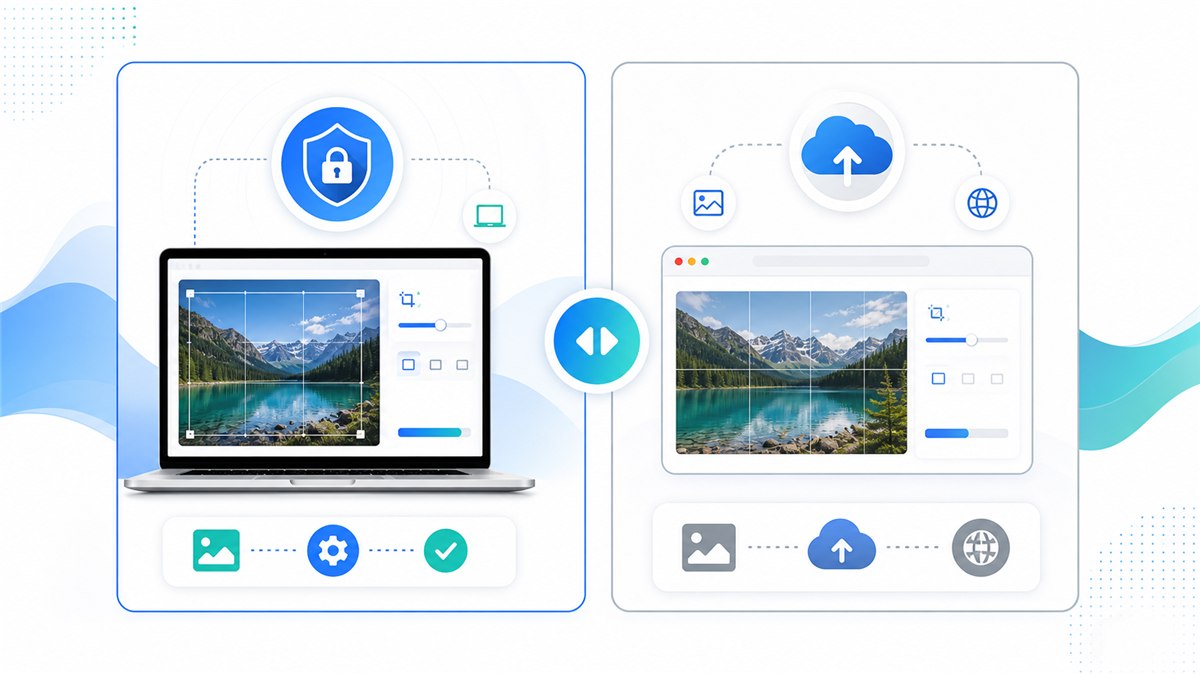
Tableau de comparaison iLoveIMG et Resizo
| Point de décision | Aide | j'aimeIMG |
|---|---|---|
| Modèle de traitement | Traitement local via le navigateur pour les flux de travail pris en charge | Traitement cloud/serveur pour la plupart des outils |
| Meilleur ajustement | Redimensionnement privé, sortie rapide, flux de travail sans compte | Large boîte à outils d'images avec de nombreuses fonctionnalités cloud |
| Limites gratuites | Pas de limite de téléchargement côté serveur, car les fichiers ne sont pas téléchargés | La page de tarification officielle répertorie le traitement limité sur les niveaux de base et les limites plus élevées sur les niveaux payants. |
| Angle de confidentialité | Les fichiers originaux restent sur l'appareil pendant les tâches locales | Les téléchargements sont gérés par le service, alors lisez leurs conditions de confidentialité et de traitement. |
| Contrôle de sortie | Paramètres de redimensionnement, de qualité, de format et de lot en un seul flux léger | Ensemble complet d'outils d'image distincts avec des différences de capacités basées sur le plan |
Cette comparaison ne vise pas à transformer chaque flux de travail en un choix où le gagnant remporte tout. iLoveIMG peut être utile lorsque son flux de travail cloud, son automatisation ou son ensemble de fonctionnalités correspondent à vos besoins. Resizo est la meilleure valeur par défaut lorsque l'image originale doit rester sur votre appareil, lorsque vous avez besoin de dimensions exactes avant la compression ou lorsque vous souhaitez un résultat rapide sans friction de compte.
Introduction
Resizo vs iLoveIMG : la confidentialité, la vitesse, les limites et les meilleurs cas d'utilisation sont importants car le travail sur l'image est rarement une simple tâche esthétique. Une seule photo surdimensionnée peut ralentir un site Web, faire échouer le téléchargement d'un formulaire, exposer du contenu privé ou créer des galeries de produits incohérentes. Une seule exportation surcompressée peut rendre les visages cireux, le texte illisible et les graphiques de la marque peu professionnels.
La meilleure approche est simple : commencez par la destination réelle, définissez d'abord les dimensions en pixels, choisissez un format qui correspond au contenu, exportez une fois et inspectez le résultat avant de le publier ou de le partager. Resizo est construit autour de ce flux de travail. Il exécute des opérations d'image courantes dans le navigateur, ce qui signifie que les tâches de redimensionnement, de compression, de conversion et d'aperçu prises en charge peuvent être effectuées localement au lieu de nécessiter un pipeline de téléchargement en premier.
Pour les fichiers sensibles, le traitement local est particulièrement important. Les images privées peuvent contenir des visages, des lieux, des documents, des prototypes de produits, des captures d'écran internes ou des métadonnées. Même lorsqu'un service cloud est légitime, le modèle de confidentialité est différent d'un flux de travail local sur navigateur. L'habitude la plus sûre est d'éviter de télécharger les originaux, sauf si le téléchargement est nécessaire et que vous faites confiance aux conditions de service.
Qu'est-ce que Resizo vs iLoveIMG : confidentialité, vitesse, limites et meilleurs cas d'utilisation ?
Resizo vs iLoveIMG : confidentialité, vitesse, limites et meilleurs cas d'utilisation est le processus consistant à transformer une image originale en une sortie plus sûre, plus petite et mieux adaptée à une destination spécifique. La destination peut être un héros de site Web, une galerie de produits de commerce électronique, un formulaire de demande d'emploi, une pièce jointe à un e-mail, un profil social, une capture d'écran de documentation ou un avis client interne.
Concrètement, le flux de travail comprend quatre décisions : dimensions, format, qualité et confidentialité. Les dimensions déterminent le nombre de pixels que contient l'image finale. Le format décide si le fichier doit être JPEG, PNG, WebP ou un autre type. La qualité contrôle le compromis entre la compression et les détails visuels. La confidentialité décide si l'image originale doit rester sur l'appareil ou être téléchargée sur un processeur cloud.
Les navigateurs modernes prennent en charge l'exportation d'images via des API Web. Les documents MDN que l'exportation de canevas peut créer des blobs d'images et que des formats tels que PNG sont requis tandis que JPEG et WebP sont largement pris en charge par de nombreux navigateurs. C'est pourquoi les outils axés sur le navigateur peuvent gérer de nombreuses tâches quotidiennes liées aux images sans aller-retour vers le serveur.
Pourquoi c'est important
Les erreurs d’image coûtent cher car il est facile de les manquer. Un propriétaire de site Web peut télécharger une photo de téléphone de 5 Mo et se demander pourquoi la page semble lente. Un étudiant peut compresser une image d'identité jusqu'à ce que le texte devienne illisible. Un vendeur peut télécharger des photos de produits avec des cultures qui ne correspondent pas et rendre l'ensemble du catalogue moins digne de confiance. Un pigiste peut envoyer des images de clients via un outil aléatoire, car il s'agissait du premier résultat de recherche.
choisissez Resizo lorsque la confidentialité, l'absence de téléchargement, le redimensionnement rapide et le contrôle direct du format sont plus importants qu'une grande suite cloud multi-outils. C’est la principale raison d’utiliser un flux de travail ciblé au lieu de deviner. Le but n’est pas de courir après le plus petit nombre possible. L'objectif est de créer un fichier suffisamment petit, suffisamment clair, correctement dimensionné et adapté au niveau de confidentialité du contenu.
Google Search Central recommande également d'utiliser des éléments d'image HTML standard, du texte alternatif utile, des formats pris en charge, des données structurées et des pages d'images optimisées pour la vitesse et la qualité. En d’autres termes, l’optimisation des images n’est pas seulement une corvée de conception. Cela affecte l'accessibilité, la visibilité de la recherche, la confiance des utilisateurs et la conversion.
Avantages clés
- Vous réduisez le temps de téléchargement perdu, car la comparaison du redimensionnement des images axée sur la confidentialité a lieu avant que le fichier n'atteigne un site Web, un formulaire ou un CMS.
- Vous rendez le résultat prévisible : dimensions exactes, taille de fichier raisonnable et format adapté à la destination.
- Vous protégez l’image originale en exportant une copie optimisée distincte au lieu de modifier la seule version dont vous disposez.
- Vous évitez les dommages de qualité courants tels que les proportions étirées, la compression répétée et la mise à l’échelle inutile.
- Vous créez des images plus faciles à télécharger pour les utilisateurs et plus faciles à comprendre pour les moteurs de recherche lorsqu'elles sont combinées avec de bons noms de fichiers et du texte alternatif.
Pour les créateurs, les vendeurs de commerce électronique, les spécialistes du marketing, les concepteurs de sites Web, les étudiants et les petites équipes, le plus grand avantage est généralement le contrôle. Vous décidez ce qui quitte l'appareil, ce qui est redimensionné, quel format est exporté et quel niveau de qualité est acceptable. Ce contrôle est difficile à obtenir lorsque chaque petite tâche d’image commence par un téléchargement obligatoire et une exportation en boîte noire.
Guide étape par étape
- Décidez de ce qui compte le plus : confidentialité, taux de compression, dimensions exactes, taille du lot ou variété d'outils.
- Testez la même image originale dans Resizo Image Resizer et iLoveIMG afin de comparer la sortie réelle plutôt que les affirmations.
- Vérifiez les dimensions finales en pixels, le format et la taille du fichier. Un fichier plus petit n’est pas automatiquement meilleur s’il est flou ou mal recadré.
- Ouvrez la sortie avec un zoom de 100 % et inspectez les faces, le texte, les bords du produit, les zones transparentes et les dégradés de couleurs.
- Pour les fichiers privés ou clients, préférez le workflow local Resizo afin que les originaux restent sur l'appareil pendant le redimensionnement et la compression.
- Pour les ressources publiques où une compression automatisée maximale est importante, comparez la sortie d'iLoveIMG avec une exportation Resizo WebP ou JPEG.
- Conservez les fichiers originaux dans un dossier séparé et exportez une copie clairement nommée et prête pour le Web.
Paramètres recommandés
| Cas d'utilisation | Format/outil recommandé | Cible de taille | Meilleure pratique |
|---|---|---|---|
| Images privées ou clients | Flux de travail local Resizo | Dimensions de sortie exactes | Idéal lorsque les fichiers doivent rester sur l'appareil |
| Compression simple uniquement | j'aimeIMG | Dimensions d'origine | Utile lorsque la compression basée sur le téléchargement est acceptable |
| Redimensionner et compresser | Aide | Définir ensemble la largeur et la qualité | Évite les outils séparés et les exportations répétées |
| Opérations de répétition importantes | Testez les deux outils | Mesurer le rendement et le temps | Choisissez en fonction de la confidentialité, de la vitesse et des limites |
Ces paramètres sont des points de départ et non des lois. Un portrait, une capture d’écran, un logo transparent et une photo de produit Marketplace se comportent tous différemment. Testez toujours quelques fichiers représentatifs avant de traiter un dossier volumineux.
Meilleures pratiques
- Commencez par l’original de la plus haute qualité dont vous disposez. Redimensionner une mauvaise copie amplifie généralement les blocs de flou et de compression.
- Définissez les dimensions avant la qualité. Le nombre de pixels est généralement le principal facteur déterminant la taille du fichier.
- Utilisez un seul pass d’exportation. La réouverture et la recompression de la même sortie encore et encore provoquent des dommages visibles.
- Conservez un petit ensemble de tests avec différents types d'images : portrait, produit, capture d'écran, photo sombre et graphique transparent.
- Utilisez des noms descriptifs tels que resized-passport-photo.jpg ou product-main-1200.webp au lieu de IMG_4829-final-final.jpg.
- Conservez le fichier exporté à proximité de la copie pertinente sur la page et utilisez un texte alternatif naturel, en suivant les conseils de référencement des images de Google.
Une habitude experte fait une grande différence : nommer le résultat en fonction de son objectif et non de son humeur. Un fichier appelé page d'accueil-hero-1600.webp indique exactement à un futur éditeur de quoi il s'agit. Un fichier appelé final-nouveau-2.jpg ne leur dit rien et conduit généralement à un travail en double.
Erreurs courantes
- Télécharger des photos sensibles sur un outil avant de vérifier comment le service traite et stocke les fichiers.
- Forcer une largeur et une hauteur fixes qui déforme les personnes, les produits, les logos ou les documents.
- Mise à l'échelle d'une petite image source et s'attendre à ce que de vrais détails apparaissent. La mise à l'échelle peut agrandir les pixels, mais elle ne peut pas recréer les informations manquantes.
- Utiliser PNG pour chaque photo. Le format PNG est excellent pour la transparence et les graphiques nets, mais les photos deviennent souvent inutilement volumineuses.
- Ignorer le cas d'utilisation final. Un master de qualité d'impression et un aperçu Web rapide sont des fichiers différents avec des exigences différentes.
- Suppression des originaux trop tôt. Conservez toujours les fichiers sources jusqu'à ce que l'ensemble optimisé soit actif et vérifié.
L’erreur la plus courante consiste à optimiser une mauvaise métrique. Le plus petit fichier n’est pas toujours le meilleur. Le meilleur fichier est celui qui se charge rapidement, correspond à la taille que les utilisateurs voient, répond aux exigences de destination et n'expose pas plus d'informations privées que nécessaire.
Conseils avancés
- Créez deux exportations pour les ressources Web importantes : une version principale de 1 600 px pour les grands écrans et une version plus petite de 800 px pour les vignettes ou les cartes.
- Pour le commerce électronique, intégrez un recadrage et un arrière-plan cohérents au processus avant la compression. La cohérence visuelle compte souvent autant que la taille du fichier.
- Pour les captures d'écran, testez PNG et WebP. Les captures d'écran contenant beaucoup de texte peuvent avoir un aspect pire si elles sont compressées comme des photos ordinaires.
- Pour les formulaires avec des limites strictes en Ko, redimensionnez d’abord les dimensions, puis réduisez progressivement la qualité par petites étapes.
- Pour les flux de travail privés, chargez l'outil, déconnectez-vous d'Internet et terminez le traitement local une fois la page ouverte.
- Documentez vos paramètres préférés afin que les membres de l'équipe exportent de la même manière à chaque fois.
Si vous gérez un workflow récurrent, créez une petite feuille de préréglages interne. Incluez la largeur cible, le format de sortie, la plage de qualité, le modèle de dénomination et la liste de contrôle de révision. Cette feuille permet de gagner plus de temps que de deviner les paramètres à chaque fois qu'un nouveau lot arrive.
Exemples réels et cas d'utilisation
| Scénario | Problème | Flux de travail Resizo recommandé |
|---|---|---|
| Petite entreprise | Les photos de produits doivent être recadrées, redimensionnées et nommées de manière cohérente avant d'être téléchargées. | Utilisez Resizo pour le redimensionnement et la dénomination locaux ; comparez iLoveIMG si vous avez besoin de sa boîte à outils cloud plus large. |
| Professeure | Les photos des étudiants et les formulaires numérisés doivent être réduits pour le courrier électronique. | Utilisez le traitement local Resizo car les fichiers sont sensibles. |
| Designer | Les images de marketing public nécessitent plusieurs modifications rapides. | L’un ou l’autre outil peut fonctionner ; choisissez en fonction de la confidentialité et si le traitement basé sur le téléchargement est acceptable. |
Exemples avant et après
| Avant | Action | Résultat typique | Pourquoi ça marche |
|---|---|---|---|
| Photo du téléphone, 4032 x 3024, 4,8 Mo | Redimensionnez à 1600 px de large et exportez WebP/JPEG en qualité 80 | Souvent 250-700 Ko | Idéal pour les blogs, les portfolios et les téléchargements Web de base |
| Capture d'écran PNG, 2880 px de large, 2,4 Mo | Redimensionner pour afficher la taille et tester PNG vs WebP | Souvent 300-900 Ko | Maintient le texte de l'interface utilisateur lisible tout en supprimant les pixels surdimensionnés |
| Ensemble d'images de produit, dimensions mixtes | Redimensionnement par lots pour obtenir un canevas cohérent et renommer les fichiers | Actifs de galerie cohérents | Améliore l'UX et évite les sauts de mise en page |
| Photo de profil privée | Recadrer le carré, redimensionner à la taille de la plate-forme, exporter localement | Image de profil petite et propre | Évite de télécharger la photo originale haute résolution |
Les exemples avant et après doivent être traités comme des plages réalistes et non comme des garanties. Les économies de compression dépendent de l'image d'origine, du bruit, des dimensions, du format et du niveau de détails visuels qui doivent être préservés. Le flux de travail reste fiable : redimensionnez d'abord les pixels inutiles, choisissez le format du contenu, puis ajustez la qualité uniquement dans la mesure où le cas d'utilisation le permet.
Flux de travail pratique avec Resizo Image Resizer
Ouvrir Redimensionneur d'image Resizo, ajoutez un fichier représentatif et exécutez un petit test. Vérifiez l'aperçu. Si le résultat semble correct, répétez les mêmes paramètres sur le lot complet. Pour les fichiers sensibles, faites-le avant d'envoyer des images par courrier électronique, formulaires, téléchargements CMS ou portails clients. Pour les ressources Web publiques, combinez l'exportation avec des noms de fichiers descriptifs, du texte alternatif utile et des dimensions d'image dans le HTML pour réduire les changements de mise en page.
Lorsque la qualité compte, comparez à deux niveaux de zoom. Visualisez d’abord l’image à la taille réelle que les utilisateurs verront. Inspectez ensuite avec un zoom de 100 % le texte, les faces, les bords du produit et la transparence. S'il réussit les deux vérifications, le fichier est généralement prêt.
Sources d'autorité externes à vérifier
| Source | Pourquoi c'est utile | URL |
|---|---|---|
| MDN HTMLCanvasElement.toBlob | Explique comment le canevas du navigateur exporte les objets blob d’images, les formats et les paramètres de qualité. | https://developer.mozilla.org/en-US/docs/Web/API/HTMLCanvasElement/toBlob |
| web.dev Apprendre les images | Une référence pratique pour les formats d'images Web, les images réactives et les performances. | https://web.dev/learn/images |
| Meilleures pratiques de référencement d'images Google | Conseils Google pour les images détectables, le texte alternatif, les données structurées et les pages d'images rapides. | https://developers.google.com/search/docs/appearance/google-images |
| Tarifs iLoveIMG | Répertorie les forfaits gratuits et payants, les limites de tâches, les limites de taille de fichier et les détails du forfait liés à la sécurité. | https://www.iloveimg.com/pricing |
| Page de confidentialité d'iLoveIMG | Liens vers les informations de confidentialité d'iLoveIMG et décrit ses engagements en matière de transparence. | https://www.iloveimg.com/help/privacy |
Foire aux questions
Resizo est-il meilleur que iLoveIMG ?
Resizo est meilleur pour le redimensionnement local sans téléchargement et les flux de travail privés rapides. iLoveIMG est une suite d'images cloud plus large. Le bon choix dépend de l’importance de la confidentialité, des limites de fichiers ou de la variété des outils.
Puis-je faire cela avec Resizo Image Resizer ?
Oui. Resizo Image Resizer est conçu pour ce flux de travail précis. Vous pouvez choisir les dimensions, le format et les paramètres de qualité, puis télécharger une copie optimisée sans modifier l'original.
Est-ce que Resizo télécharge mes images ?
Pour les outils de navigateur Resizo pris en charge, l'image est traitée localement dans votre navigateur. Cela signifie que le fichier original reste sur votre appareil pendant le redimensionnement, la compression, la conversion et l'aperçu.
Quel format dois-je choisir ?
Utilisez WebP pour la plupart des pages Web modernes, JPEG pour une large compatibilité photo et PNG lorsque vous avez besoin de transparence, de graphiques d'interface utilisateur nets ou de détails de capture d'écran précis.
La réduction de la taille des fichiers réduira-t-elle toujours la qualité ?
Pas toujours de manière visible. Si vous réduisez d'abord les pixels inutiles et utilisez des paramètres de qualité raisonnables, le fichier peut devenir beaucoup plus petit tout en conservant la même apparence à la taille d'affichage normale.
Quel paramètre de qualité est le meilleur ?
Pour les photos, commencez vers 75-85 et inspectez le résultat. Pour les captures d'écran ou les graphiques, testez PNG et WebP, car la compression de photos ordinaire peut rendre le texte et les bords rugueux.
Quelles sont les limites gratuites d'iLoveIMG ?
iLoveIMG répertorie un traitement limité sur son forfait de base et des limites de traitement/taille de fichier plus élevées sur les forfaits payants. Vérifiez toujours la page de tarification officielle actuelle avant de vous fier à une limite.
Dois-je supprimer l’original après l’exportation ?
Non. Conservez l’original jusqu’à ce que l’image finale ait été téléchargée, examinée et approuvée. Stockez les exportations optimisées dans un dossier séparé afin de pouvoir les régénérer ultérieurement.
Comment puis-je éviter une sortie floue ?
Ne mettez pas à niveau les petits fichiers, gardez les proportions verrouillées, exportez à partir de l'original et vérifiez le résultat avec un zoom de 100 % avant de l'utiliser en production.
Est-ce bon pour le référencement ?
Oui, lorsqu'il est combiné avec des tailles de fichiers rapides, des noms de fichiers descriptifs, un texte alternatif utile, des éléments d'image HTML appropriés et un contenu de page pertinent à proximité de l'image.
Conclusion
Resizo vs iLoveIMG : confidentialité, vitesse, limites et meilleurs cas d'utilisation ne consiste pas à rechercher un numéro de compression magique. Il s’agit de choisir le résultat le plus sûr et le plus utile pour le travail à accomplir. Commencez par la destination, redimensionnez les pixels avant de baisser la qualité, choisissez le bon format et protégez les originaux privés. Resizo Image Resizer vous offre un flux de travail local rapide pour ce faire sans transformer une simple tâche d'image en un processus de téléchargement lourd.
Utilisez Resizo lorsque vous souhaitez un contrôle pratique : dimensions, format, qualité, confidentialité et vitesse des lots. Utilisez des outils concurrents ou cloud uniquement lorsque leurs fonctionnalités spécifiques valent le flux de travail de téléchargement et de compte pour votre cas d'utilisation.
Résolvez-le avec Resizo Image Resizer
choisissez Resizo lorsque la confidentialité, l'absence de téléchargement, le redimensionnement rapide et le contrôle direct du format comptent plus qu'une grande suite cloud multi-outils
Essayez Resizo gratuitement